Personalized Content Delivery System: Building an AI-powered recommendation engine with Laravel and MongoDB
Last updated on by Moses Anumadu
Showing the same posts to every user can quickly become limiting, as different users find different things interesting. There should be some form of content personalization to enable the platform to recommend related content to a user based on what they are viewing.
This can be done using tags and randomizing the suggested post. This works, but the prediction is not precise. Just tagging isn't enough to determine the perfect next match following the post being viewed.
Nowadays, modern applications implement this by personalizing in different ways. Platforms like Netflix, Facebook, LinkedIn, etc, use AI-driven recommendation systems to suggest relevant content and keep users engaged.
What we are building
In this tutorial, we'll build a simple AI-powered recommendation engine for a blog API using Laravel, MongoDB, vector embeddings, and MongoDB Vector Search to deliver content based on meaning rather than just keywords or tags.
For example, let's say a user reads: "Getting Started with Laravel APIs", the system will recommend related posts like "Building REST APIs in Laravel" and "Laravel API Authentication."
This recommendation is not based on keywords or tags. It is conceptual. The platform understands the actual meaning the post holds and recommends the next post based on the meaning.
Under the hood, we'll:
- Convert posts into vectors (embeddings)
- Store them in MongoDB
- Use vector similarity search to find related content
With that said, let's get started.
Prerequisite
To follow along with this post, ensure you have the following:
- A working knowledge of Laravel
- Laravel development environment
- A MongoDB Atlas cluster
- Blog datasets for seeding our post collection
Understanding AI Embeddings
An embedding is a way to convert text into numbers so that a computer can work with it. Imagine taking a sentence and translating its meaning into a long list of numbers. It might look something like this: [0.12, -0.44, 0.88, ...]
On its own, that list doesn't mean much to us. You can't read it and understand anything. But to a computer, it's a way of representing meaning in a format it can compare.
If two pieces of text mean similar things, the lists of numbers they produce will also be similar.
For example:
- "Laravel API authentication"
- "Securing APIs in Laravel"
These are written differently, but they're talking about the same idea. When converted into embeddings, their numbers will be close to each other.
Now imagine you have hundreds of posts, all converted into these number representations. If a user is reading one post, you can take its embedding and ask:
"Which other posts have embeddings that look like this one?"
The closest ones are likely about similar topics. And that's really the whole idea behind what we're building.
Generating embeddings for blog posts
We need to create a new Laravel project and configure it to connect to MongoDB Atlas. But first, we need a fresh Laravel project. Let's create it using the command below:
composer create project laravel/laravel devrel-tutorial-contentPersonalizationLaravel does not come with support for MongoDB out of the box. We need to configure the newly created project to work with MongoDB. Ensure you have the MongoDB PHP Extension installed and added to your php.ini file. Follow the instructions in the MongoDB PHP driver installation guide if you need help installing.
Next, let's install the Laravel MongoDB package. This is a must for MongoDB to work in our Laravel project. In the project directory, install it using the composer command below.
composer require mongodb/laravel-mongodbConfigure your .env File
We need to add your MongoDB Atlas connection details to the .env file. Log in to your MongoDB Atlas account and replace the MONGODB_URL below with your connection string.
MONGODB_URI="mongodb+srv://USERNAME:PASSWORD@cluster0.xxxxx.mongodb.net/?retryWrites=true&w=majority&appName=devrel-tutorial-contentPersonalization-laravelnews"MONGODB_DATABASE=devrel-mongodb-contentpersonalizationConfigure config/database.php
The next step is to add the MongoDB configuration to config/database.php. Open the file and add the code below to the connections array:
'mongodb' => [ 'driver' => 'mongodb', 'dsn' => env('MONGODB_URI'), 'database' => env('MONGODB_DATABASE'),],Also, set the default database connection variable to MongoDB like so:
'default' => env('DB_CONNECTION', 'mongodb'),With that done, let's proceed to seeding the dataset that we need for this. Since we are dealing with meaning, we can't just seed random data using Faker. We need actual posts with reasonable length and meaning.
To get started, let's create a Post model, controller, and factory using the command below:
php artisan make:model Post -cfIn app/Model/Post.php update the content with the code below.
<?php namespace App\Models; use Illuminate\Database\Eloquent\Factories\HasFactory;use MongoDB\Laravel\Eloquent\Model; class Post extends Model{ /** @use HasFactory<\Database\Factories\PostFactory> */ use HasFactory; protected $connection = 'mongodb'; protected $collection = 'posts'; protected $fillable = [ 'title', 'body' ];}Next, we need to generate embeddings for our blog posts and seed them with these embeddings.
When building modern search or AI applications, developers can choose from a variety of high-performance embedding models, including OpenAI's text-embedding-3-small, Google's Gemini Embeddings, Voyage AI's voyage-3-large, and the open-source BAAI/bge-small-en-v1.5 available via Hugging Face.
For the sake of this tutorial, we will use BAAI/bge-small-en-v1.5 available via Hugging Face because it is open source and free. For this, you will need a Hugging Face API key. Follow the instructions here to set it up if you do not already have one.
Next, add the following to your .env file
HUGGINGFACE_API_KEY="YOUR_API_KEY"HUGGINGFACE_API_URL="https://router.huggingface.co/hf-inference/models/BAAI/bge-small-en-v1.5"Then create a service class in app\Services\EmbeddingService.php and update the content of the page with the code below:
<?php namespace App\Services; use Illuminate\Support\Facades\Http; class EmbeddingService{ public function generate(string $text): array { $response = Http::withHeaders([ 'Authorization' => 'Bearer ' . env('HUGGINGFACE_API_KEY'), ])->post(env('HUGGINGFACE_API_URL'), [ 'inputs' => $text, ]); return $response->json(); }}This EmbeddingService is responsible for turning plain text into an embedding by sending it to Hugging Face. It uses Laravel's HTTP client to make a POST request to the Hugging Face inference API, passing the text through the inputs field.
The request is authenticated using an API key stored in your .env file (HUGGINGFACE_API_KEY), which is included in the request headers as a Bearer token. The actual model being used (for example, BAAI/bge-small-en-v1.5) is also defined in the environment via HUGGINGFACE_API_URL, keeping your code flexible and configuration-driven.
Once the request is processed, Hugging Face returns a vector representation of the text, which is then returned as a JSON response. This will be stored in our database for later similarity searches.
Saving Embeddings in MongoDB
Now, when seeding posts, we need to generate embeddings for each post and save them in our MongoDB Posts collection. To achieve this, we will use the service class we just created above to generate embeddings for each post.
Also, since we are dealing with meaning, we can't just use Faker, since it generates text and sentences that don't really have meaning. They are random text for testing. Not really useful for testing semantic similarity.
To proceed, I generated a few posts that have meaning. To follow along, create the following file: App\Data\PostData.php and update the content with the code below:
<?php namespace App\Data; class PostData{ public static function all(): array { return [ [ 'title' => 'Getting Started with Laravel APIs', 'body' => "Laravel provides a clean and expressive way to build APIs. With built-in routing, controllers, and request handling, developers can quickly expose endpoints that return structured JSON responses. This makes Laravel a strong choice for building both small services and large-scale backend systems.\n\nIn this guide, we explore how to define API routes, structure controllers, and return consistent responses. We also touch on best practices such as separating business logic from controllers and organizing your API for long-term maintainability.", ], [ 'title' => 'Building REST APIs in Laravel', 'body' => "REST APIs follow a resource-based architecture that relies on HTTP verbs such as GET, POST, PUT, and DELETE. Laravel makes it easy to implement RESTful APIs using resource controllers and route definitions that map cleanly to application logic.\n\nThis article walks through designing RESTful endpoints, structuring controllers, and returning proper status codes. It also highlights common pitfalls developers face when building APIs and how to avoid tightly coupled or inconsistent designs.", ], [ 'title' => 'Laravel API Authentication with Sanctum', 'body' => "Authentication is a critical part of any API. Laravel Sanctum provides a lightweight solution for issuing API tokens and authenticating requests without the complexity of OAuth. It is especially useful for SPAs and mobile applications.\n\nIn this article, we walk through installing Sanctum, generating tokens, and protecting routes. We also explore how to manage token permissions and ensure secure communication between clients and your API.", ], [ 'title' => 'JWT Authentication in Laravel', 'body' => "JSON Web Tokens (JWT) are widely used for stateless authentication in modern applications. They allow servers to verify requests without storing session data, making them ideal for distributed systems and APIs.\n\nThis guide explains how JWT works and how to implement it in Laravel. We cover token creation, validation, expiration handling, and how to integrate JWT into middleware for protecting API routes.", ], [ 'title' => 'Securing Laravel APIs with Middleware', 'body' => "Middleware acts as a filter for incoming HTTP requests and is essential for securing APIs. In Laravel, middleware can be used to enforce authentication, validate input, and apply rate limiting.\n\nThis article demonstrates how to create custom middleware, register it, and apply it to routes. It also explains how middleware contributes to cleaner and more maintainable API architecture.", ], [ 'title' => 'Understanding API Rate Limiting in Laravel', 'body' => "Rate limiting helps protect your API from abuse and ensures fair usage among clients. Laravel includes built-in support for throttling requests based on IP address or authenticated user.\n\nIn this guide, we explore how rate limiting works, how to configure limits, and how to customize responses when limits are exceeded. We also discuss strategies for balancing performance and user experience.", ], [ 'title' => 'Versioning Your Laravel APIs', 'body' => "As your API evolves, maintaining backward compatibility becomes important. Versioning allows you to introduce changes without breaking existing clients that rely on older endpoints.\n\nThis article covers different versioning strategies such as URL versioning and header-based versioning. It also explains how to structure your Laravel application to support multiple API versions cleanly.", ], [ 'title' => 'Error Handling in Laravel APIs', 'body' => "Consistent error handling improves the developer experience for anyone consuming your API. Laravel provides powerful exception handling tools that allow you to standardize error responses.\n\nIn this guide, we explore how to customize exception handling, return structured JSON errors, and ensure that your API communicates failures clearly and consistently.", ], [ 'title' => 'Optimizing Database Queries in Laravel', 'body' => "Database performance is a key factor in application speed. Inefficient queries can quickly become bottlenecks as your application grows.\n\nThis article explores techniques such as eager loading, indexing, and query optimization. We also discuss how to identify slow queries and improve performance using Laravel's built-in tools.", ], [ 'title' => 'Caching Strategies for Laravel Applications', 'body' => "Caching reduces the need to repeatedly compute expensive operations or query the database. Laravel provides a flexible caching system that supports multiple drivers including Redis and file-based storage.\n\nIn this article, we explore different caching strategies, when to cache data, and how to invalidate cache effectively. Proper caching can significantly improve application performance and scalability.", ], [ 'title' => 'Using Queues for Background Jobs in Laravel', 'body' => "Queues allow you to defer time-consuming tasks such as sending emails or processing uploads. This helps keep your application responsive while handling heavy workloads in the background.\n\nThis guide explains how to dispatch jobs, configure queue workers, and monitor job execution. We also cover retry mechanisms and failure handling.", ], [ 'title' => 'Scaling Laravel Applications for High Traffic', 'body' => "As your application grows, you need to handle increased traffic efficiently. Scaling involves optimizing both your application and infrastructure.\n\nThis article explores load balancing, database scaling, caching layers, and horizontal scaling techniques. It also highlights common challenges developers face when scaling Laravel applications.", ], [ 'title' => 'Introduction to MongoDB with Laravel', 'body' => "MongoDB is a NoSQL database designed for flexibility and scalability. Unlike relational databases, it stores data in documents, making it suitable for dynamic data structures.\n\nIn this guide, we explore how to integrate MongoDB with Laravel, define models, and perform CRUD operations. We also discuss when to choose MongoDB over traditional databases.", ], [ 'title' => 'Using MongoDB for API Data Storage', 'body' => "MongoDB is a strong choice for APIs that require flexible schemas and rapid iteration. Its document-based structure allows developers to store complex data without rigid constraints.\n\nThis article explains how to use MongoDB as the primary database for Laravel APIs, including schema design considerations and performance implications.", ], [ 'title' => 'Indexing Strategies in MongoDB', 'body' => "Indexes play a crucial role in improving database performance. Without proper indexing, queries can become slow and inefficient.\n\nThis guide explains how MongoDB indexes work, how to create them, and how to design indexes that match your query patterns for optimal performance.", ], [ 'title' => 'Introduction to AI Embeddings', 'body' => "AI embeddings transform text into numerical vectors that capture semantic meaning. These vectors allow systems to understand relationships between pieces of content beyond simple keyword matching.\n\nIn this article, we explain how embeddings are generated and why they are essential for building modern search and recommendation systems.", ], [ 'title' => 'How Vector Search Works in MongoDB', 'body' => "Vector search enables applications to find similar content based on meaning rather than exact matches. MongoDB supports this through vector indexes and similarity search queries.\n\nThis guide explains how vector search works, how to configure indexes, and how to query for similar documents using embeddings.", ], [ 'title' => 'Building a Recommendation Engine with Embeddings', 'body' => "Recommendation engines use embeddings to identify similar content and suggest it to users. This approach improves engagement by surfacing relevant information automatically.\n\nIn this article, we walk through generating embeddings, storing them, and performing similarity searches to build a simple recommendation system.", ], [ 'title' => 'Combining Keyword Search with Vector Search', 'body' => "Keyword search is fast and precise, but it lacks semantic understanding. Vector search, on the other hand, captures meaning but may miss exact matches.\n\nThis article explores how to combine both approaches into a hybrid search system that delivers more accurate and relevant results.", ], [ 'title' => 'Real-Time Content Recommendations in Laravel', 'body' => "Real-time recommendations enhance user engagement by surfacing relevant content instantly. This requires efficient querying and caching strategies.\n\nIn this guide, we explore how to generate recommendations on the fly, cache results, and optimize performance for real-time delivery in Laravel applications.", ], ]; }}We have all the posts we need for testing. Let's proceed by seeding the data. In database\Factories\PostFactor.php, update the content of the page with the code below
<?php namespace Database\Factories; use App\Models\Post;use Illuminate\Database\Eloquent\Factories\Factory; /** * @extends Factory<Post> */class PostFactory extends Factory{ public function definition(): array { return [ 'title' => fake()->sentence(), 'body' => fake()->paragraphs(3, true), 'embedding' => [], ]; }}Seeder
Now, let's proceed to seeding. If you don't have a seeder class, create one using the command below
php artisan create:seeder PostSeederUpdate the content with the code below:
<?php namespace Database\Seeders; use Illuminate\Database\Seeder;use App\Models\Post;use App\Data\PostData;use App\Services\EmbeddingService; class PostSeeder extends Seeder{ /** * Run the database seeds. */ public function run(): void { $embeddingService = app(EmbeddingService::class); $postData = PostData::all(); foreach ($postData as $post) { $text = $post['title'] . ' ' . $post['body']; $embedding = $embeddingService->generate($text); Post::factory()->create([ 'title' => $post['title'], 'body' => $post['body'], 'embedding' => $embedding, ]); } }}Let's take a moment to explain what we just did above.
This code in the run() method of the PostSeeder.php file generates and stores realistic blog posts and their embeddings in a single step. Since Faker can't give us the data we need here
We loop through each post, combine the title and body into a single string, and pass that text to the EmbeddingService. That service sends the content to Hugging Face, which returns a vector representation of the text. Once the embedding is generated, we immediately store everything in the database using the Post::create() method — including the title, body, and the embedding array.
The key idea here is that every post is saved together with its semantic representation at the time of creation. This makes it easy to run similarity queries later without generating embeddings on the fly. In a real-world application, this step would typically happen when a post is created (for example, inside a model event or service), but for this tutorial, we're doing it in the Seeder so that seeding the database automatically prepares everything we need for vector search.
Next, in DatabaseSeeder.php, update the run() function with the code below
<?php namespace Database\Seeders; use App\Models\User;use Illuminate\Database\Console\Seeds\WithoutModelEvents;use Illuminate\Database\Seeder; class DatabaseSeeder extends Seeder{ use WithoutModelEvents; /** * Seed the application's database. */ public function run(): void { $this->call([ PostSeeder::class, ]); }}Next, let's run the seeder using the command below
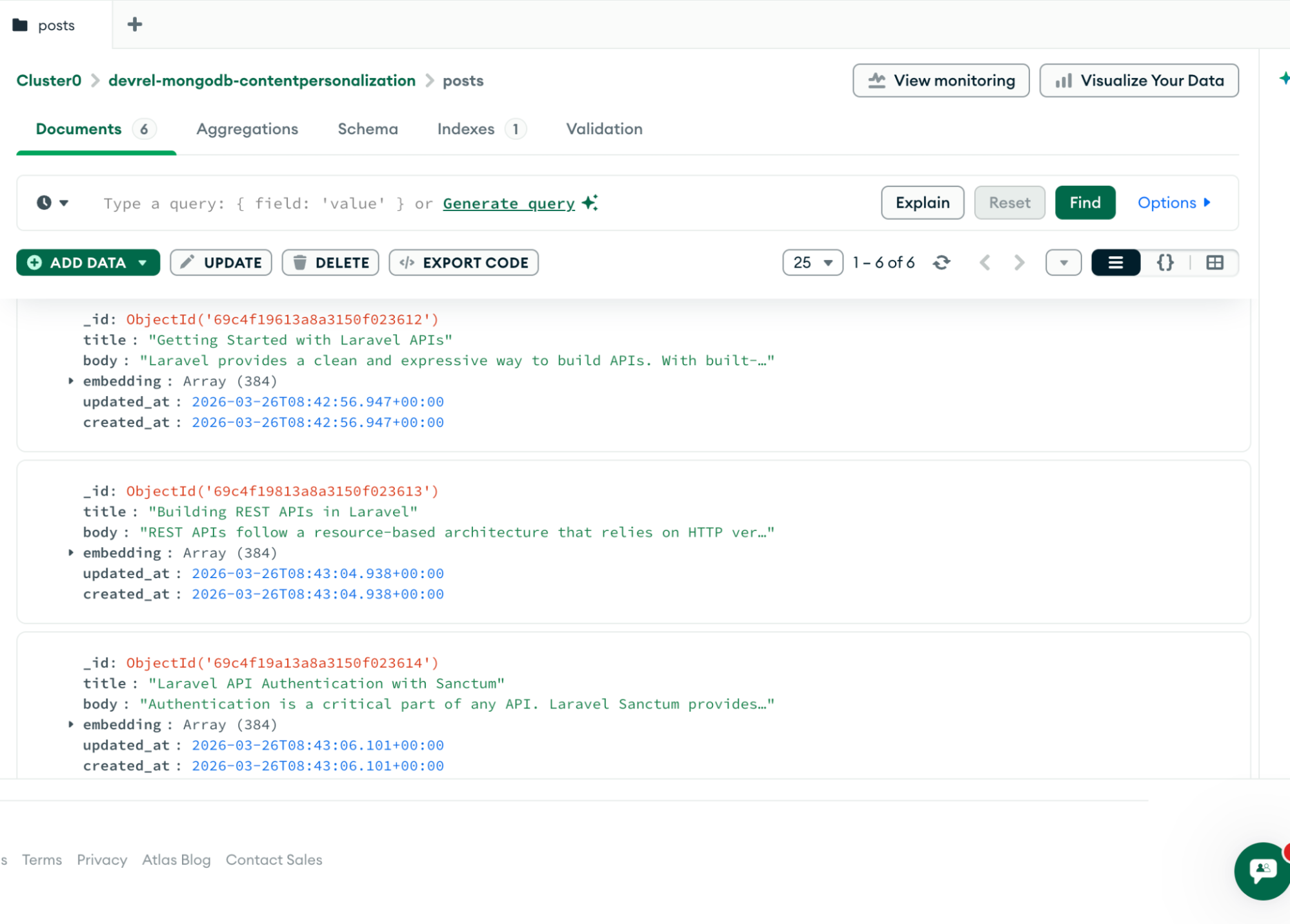
php artisan db:seederFrom the image below, you can see that we have posts with id, title, body, embedding, updated_at, and created_at. This shows that our embedding and seeder work.
Setting Up MongoDB Vector Search
This is where things get interesting. Now, we have seeded our post along with vectors. Since we are using MongoDB, which supports vector search natively, we don't need a separate vector database. We just need to setup MongoDB vector database.
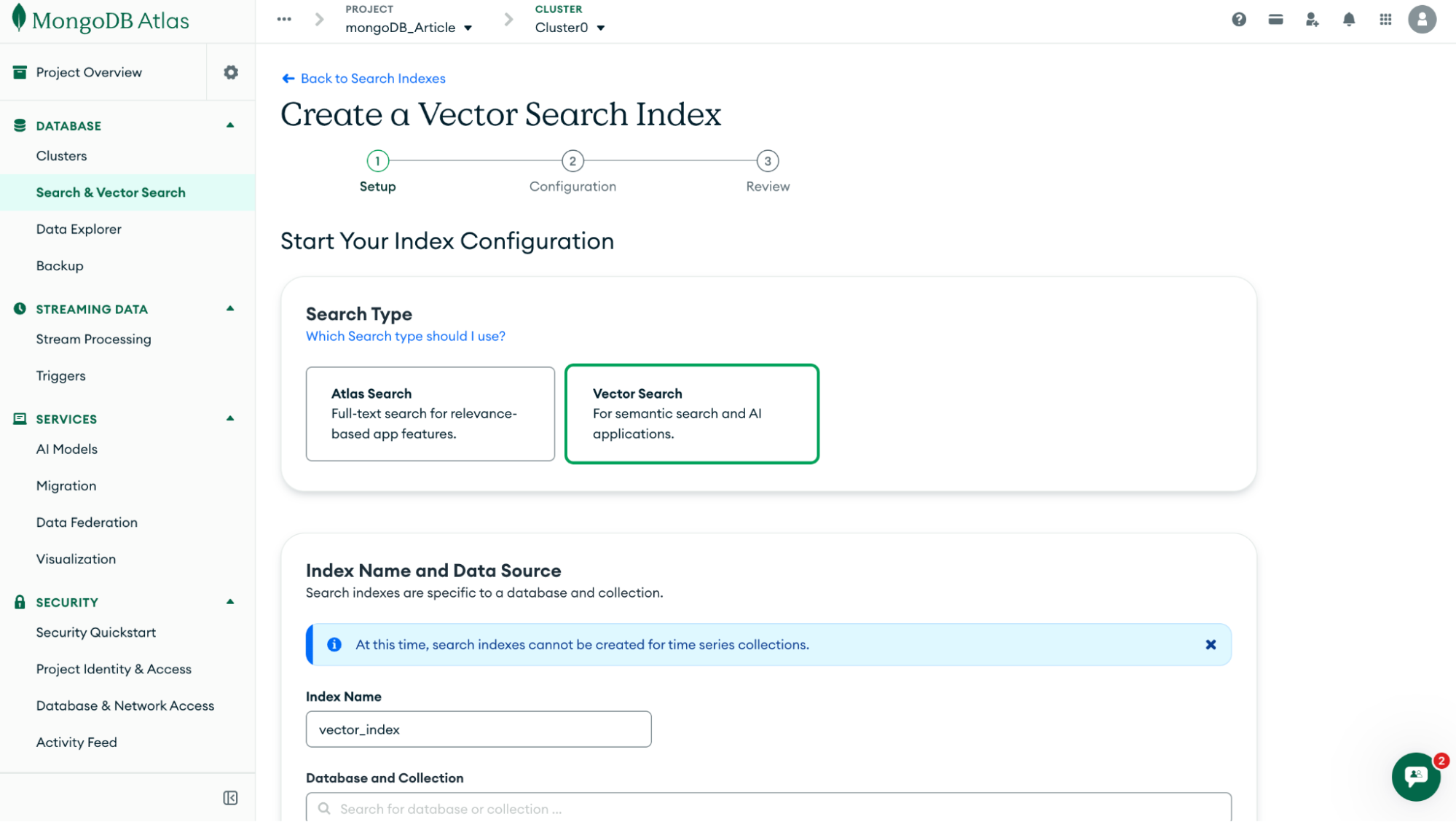
From your Atlas dashboard, navigate to Search and Vector Search -> Create a Search Index. From the Search type section, select Vector Search. Then, the Index Name field should be: vector_index. The image below explains more
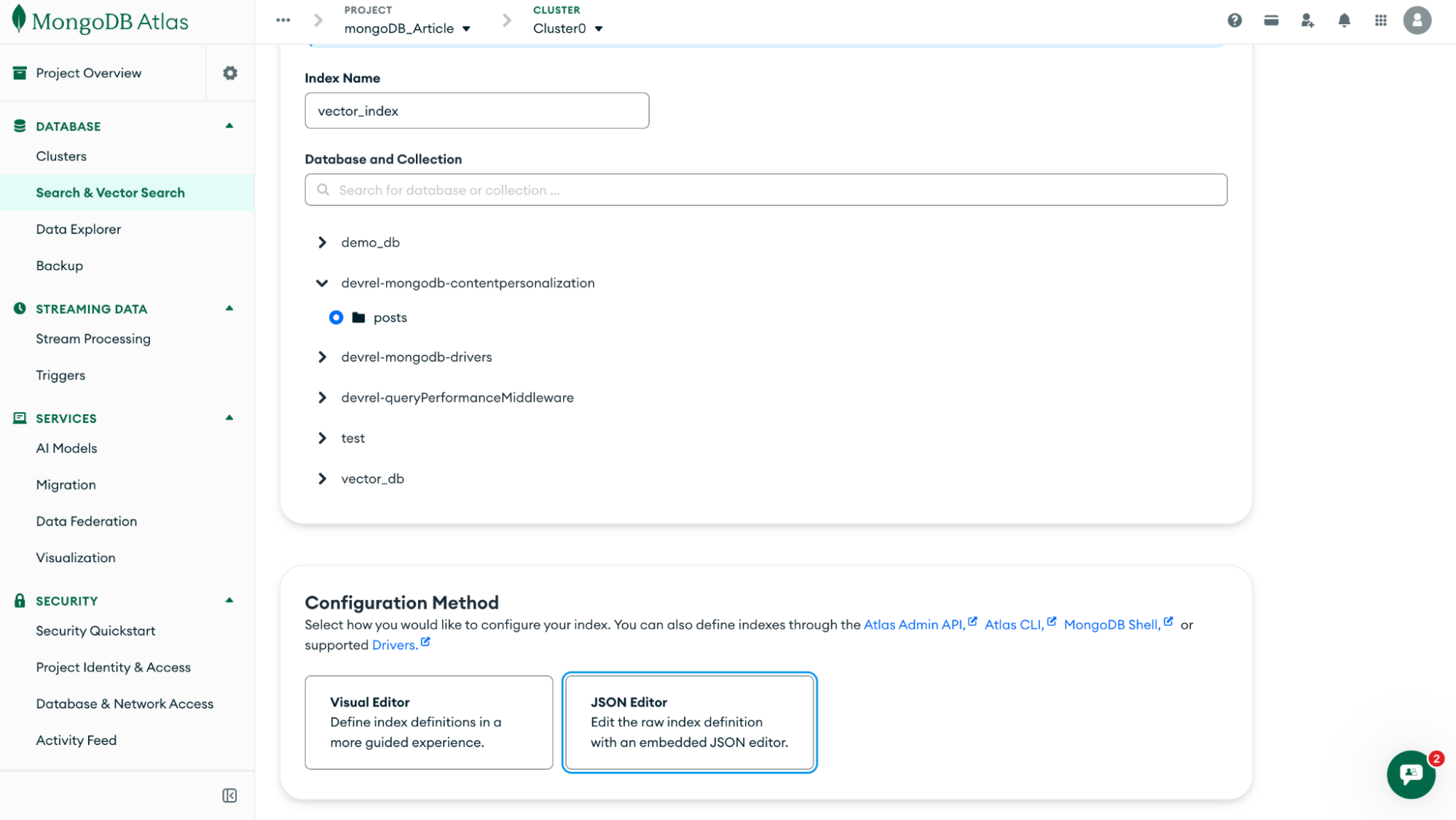
Next, from the Database collection section, select your database and posts collection. From the configuration method section, select JSON Editor. The image below provides further explanation of the steps.
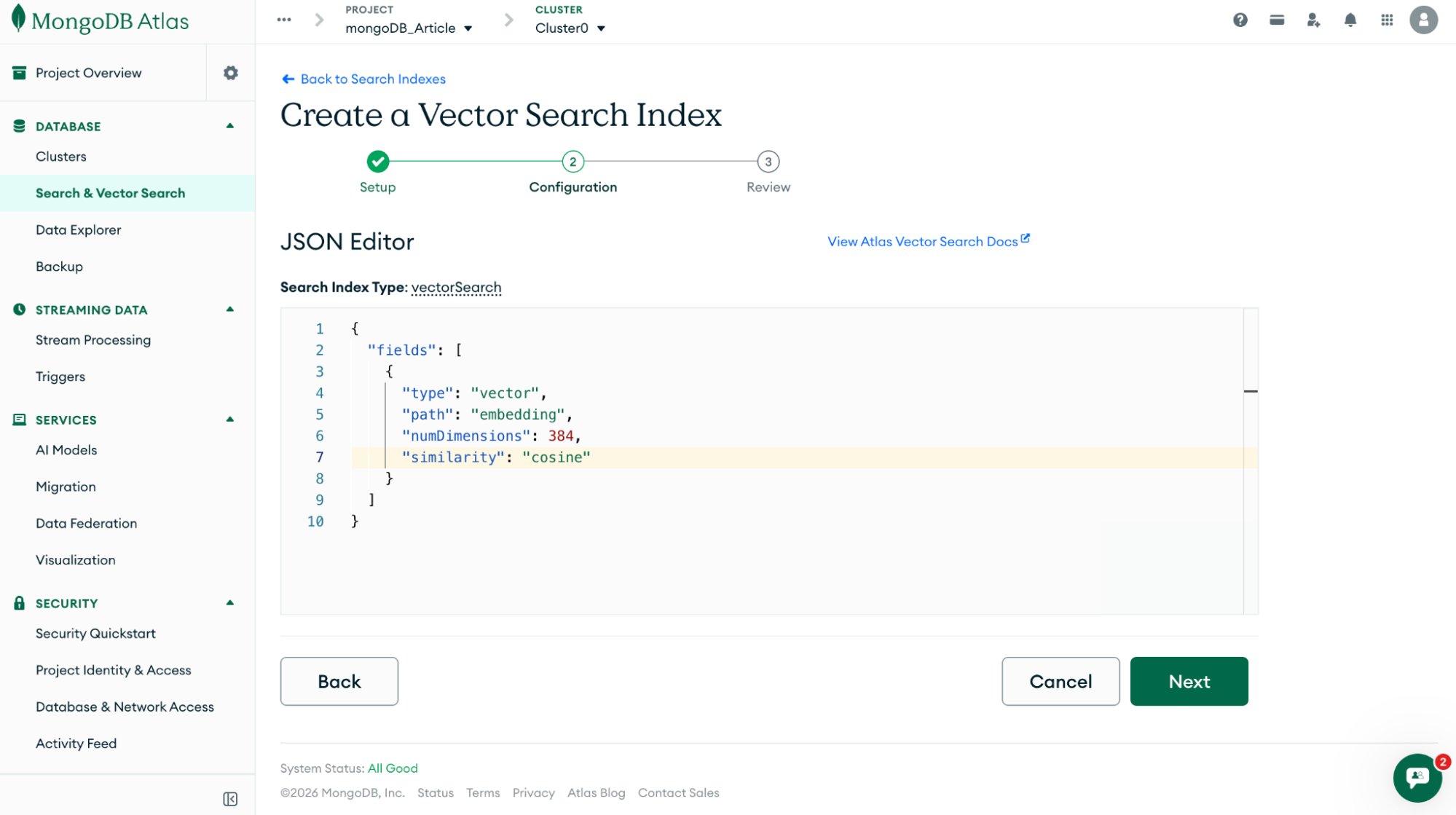
 Next, update the JSON Editor with the code below
{ "fields": [ { "type": "vector", "path": "embedding", "numDimensions": 384, "similarity": "cosine" } ]}The important part here is numDimensions. It must match the embedding size of the Model we used. In our case, we used BAAI/bge-small-en-v1.5, which is an open source model that returns a 384 numDimensions. If the numDimensions correspond, it won't work. The image below further explains the process.
Building the Recommendation Query
Now for the fun part. Let's proceed to the recommendation query. If a user fetches a post from the posts collection that already has its embedding stored. We want MongoDB to find other posts that are close to this vector.
In app\Http\Controllers\PostController.php, update the content of the page with the following
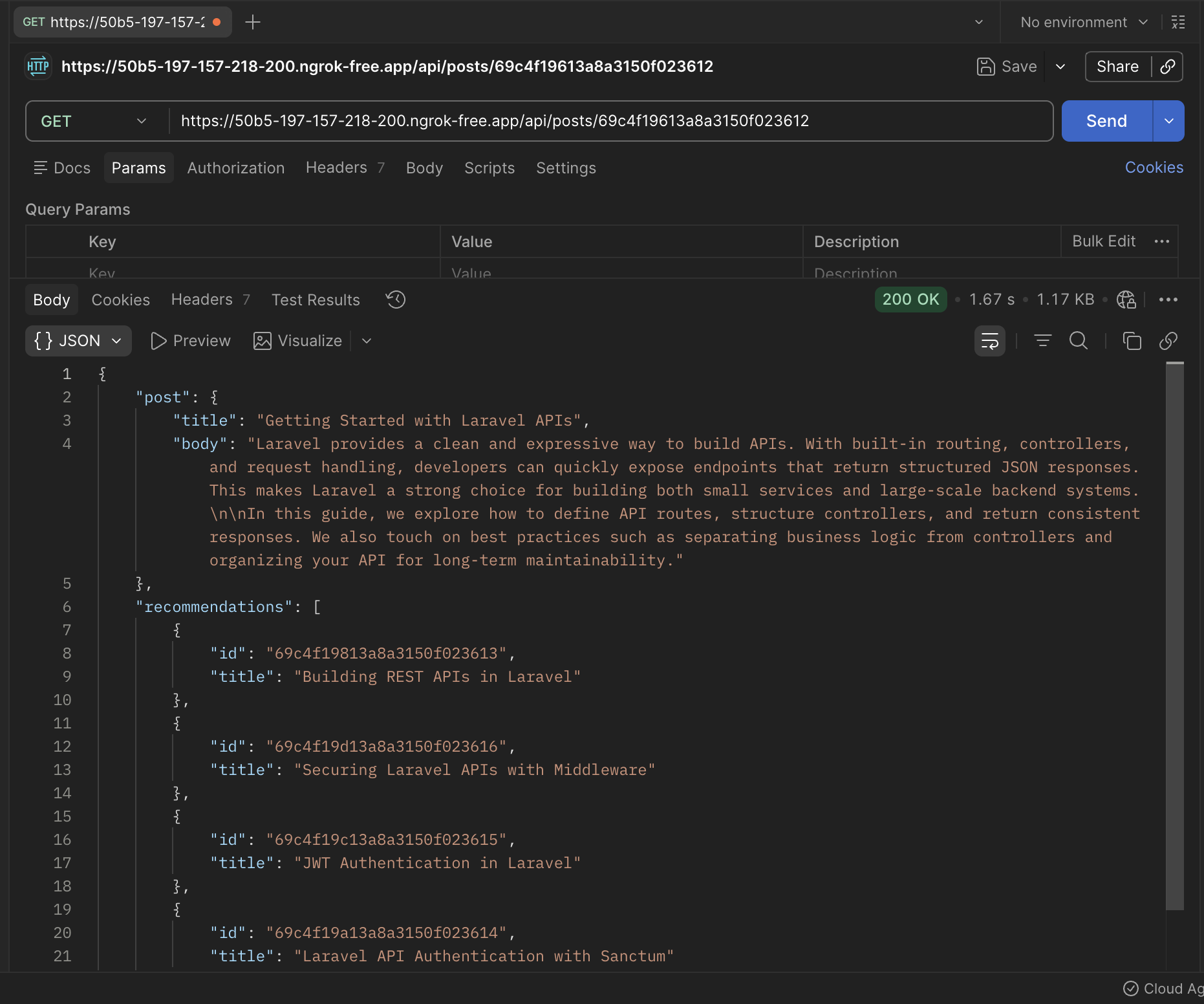
<?php namespace App\Http\Controllers; use App\Models\Post;use MongoDB\BSON\ObjectId;use Illuminate\Support\Facades\DB; class PostController extends Controller{ public function index($id) { // 1. Get current post $post = Post::findOrFail($id); // 2. Access native MongoDB collection $collection = DB::connection('mongodb') ->getMongoDB() ->selectCollection('posts'); // 3. Run vector search (RAW MongoDB QUERY) $cursor = $collection->aggregate([ [ '$vectorSearch' => [ 'index' => 'vector_index', 'queryVector' => $post->embedding, 'path' => 'embedding', 'numCandidates' => 100, 'limit' => 5, ] ] ]); // 4. Convert to Laravel collection $results = collect($cursor->toArray()); // 5. Remove current post + format $recommendations = $results ->filter(fn ($item) => (string) $item['_id'] !== (string) $post->_id) ->map(fn ($item) => [ 'id' => (string) $item['_id'], 'title' => $item['title'], ]) ->values(); // 6. Return response return response()->json([ 'post' => [ 'title' => $post->title, 'body' => $post->body, ], 'recommendations' => $recommendations, ]); }}This controller method fetches a blog post and generates recommendations based on it. It starts by retrieving the current post using its ID, then connects directly to the MongoDB posts collection using Laravel's database connection. Instead of using Eloquent, it runs a native MongoDB aggregation with $vectorSearch, passing in the post's embedding to find other posts with similar meaning. The results are converted into a Laravel collection so they can be easily manipulated—first filtering out the current post, then mapping each result to only include the id and title. Finally, it returns a JSON response containing the main post and a list of recommended posts, which can be displayed in the UI.
Test the route
To test, we need to create our API route. In routes/api.php, add the following:
<?php use Illuminate\Http\Request;use Illuminate\Support\Facades\Route;use App\Http\Controllers\PostController; Route::get('/posts/{id}', [PostController::class, 'index']);Now, to test, let's call the endpoint we just created above. I used Postman to serve the project. And Ngrok to route the project to the internet. And test using Postman.
Improving the Recommendation System
What we've built so far is a solid foundation, but in a real application, you'll likely want to go a step further and make the recommendations feel more personal. Right now, every user viewing the same post will get the same suggestions. That's useful, but it's not truly personalized. One way to improve this is to incorporate user behavior, track what a user reads, clicks, or spends time on, and use that data to influence future recommendations. Over time, the system can start to prioritize content that aligns more closely with each user's interests.
Another practical improvement is combining vector search with traditional keyword search. Vector search is great for understanding meaning, but it can sometimes miss exact matches that keywords handle well. By blending both approaches, you get the best of both worlds, precision from keyword matching and relevance from semantic understanding. You can also explore generating recommendations in real time as users interact with your application, rather than precomputing them. This opens the door to more dynamic and responsive user experiences.
Performance Considerations
As with any system that involves search and external APIs, performance matters. One of the most important things you can do is ensure your embeddings are properly indexed. Without a vector index, similarity searches will be slow and inefficient. MongoDB's vector index handles this, but it's important to configure it correctly and keep it aligned with your embedding dimensions.
You should also be mindful of how many documents you scan during a search. The numCandidates value in your query directly affects performance. Higher values may slightly improve accuracy, but will increase query time. In most cases, a reasonable limit strikes the right balance.
Another key consideration is caching. If the same post is frequently viewed, there's no need to recompute recommendations every time. Caching those results for a short period can significantly reduce load on your database. Finally, generating embeddings can be expensive since it involves external API calls. Avoid generating embeddings repeatedly - for the same content—generate embeddings once (for example, when a post is created) and reuse them.
Real-World Use Cases
This pattern isn't just for blogs; it's widely used across different types of applications. News platforms rely on similar systems to recommend related articles and keep readers engaged. E-learning platforms use it to suggest courses or lessons based on what a user has already studied. In e-commerce, it powers product recommendations such as "you might also like" or "similar items," helping users discover relevant products without having to search manually.
Content discovery platforms, in particular, benefit heavily from this approach. When users are constantly presented with content that matches their interests, they're more likely to stay engaged and explore further. What we've built here is a simplified version of that idea, but the core principle is the same—use meaning, not just keywords, to connect users with the right content.
Conclusion
In this post, we built a simple AI-powered recommendation engine using BAAI/bge-small-en-v1.5 AI model from Hugging Face to generate embeddings for semantic understanding and MongoDB Vector search for similarity queries.
We explored how semantic search works and its importance. How to fetch posts based on meaning and not just things like keywords and tags. We went on to explore ways to improve the recommendation feature can be improved, performance considerations, and some real-world use cases.
You can find the complete project on GitHub.

Software Engineer, Technical writer , PHP, Laravel, Livewire, TailwindCSS & VueJS. Laravel developer and founder at codecontent.pro