Polyscope - The agent-first dev environment for Laravel

Sublime Merge

Published on by

Sublime Merge image

The folks at Sublime Text surprised us (well at least me) today with a new app called Sublime Merge—a git client from the makers of Sublime Text.

After typing git add -p in the terminal one too many times, I thought to myself: we’ve got some pretty great tech in Sublime Text. What if we used it to build a Git client? Could we make it fast? Could we make it buttery smooth, without flickering or blocking? Could we make something that’s really, really right?

Today, I’d like to introduce Sublime Merge. It combines the UI engine of Sublime Text, with a from-scratch implementation of Git*. The result is, to us at least, something pretty special.
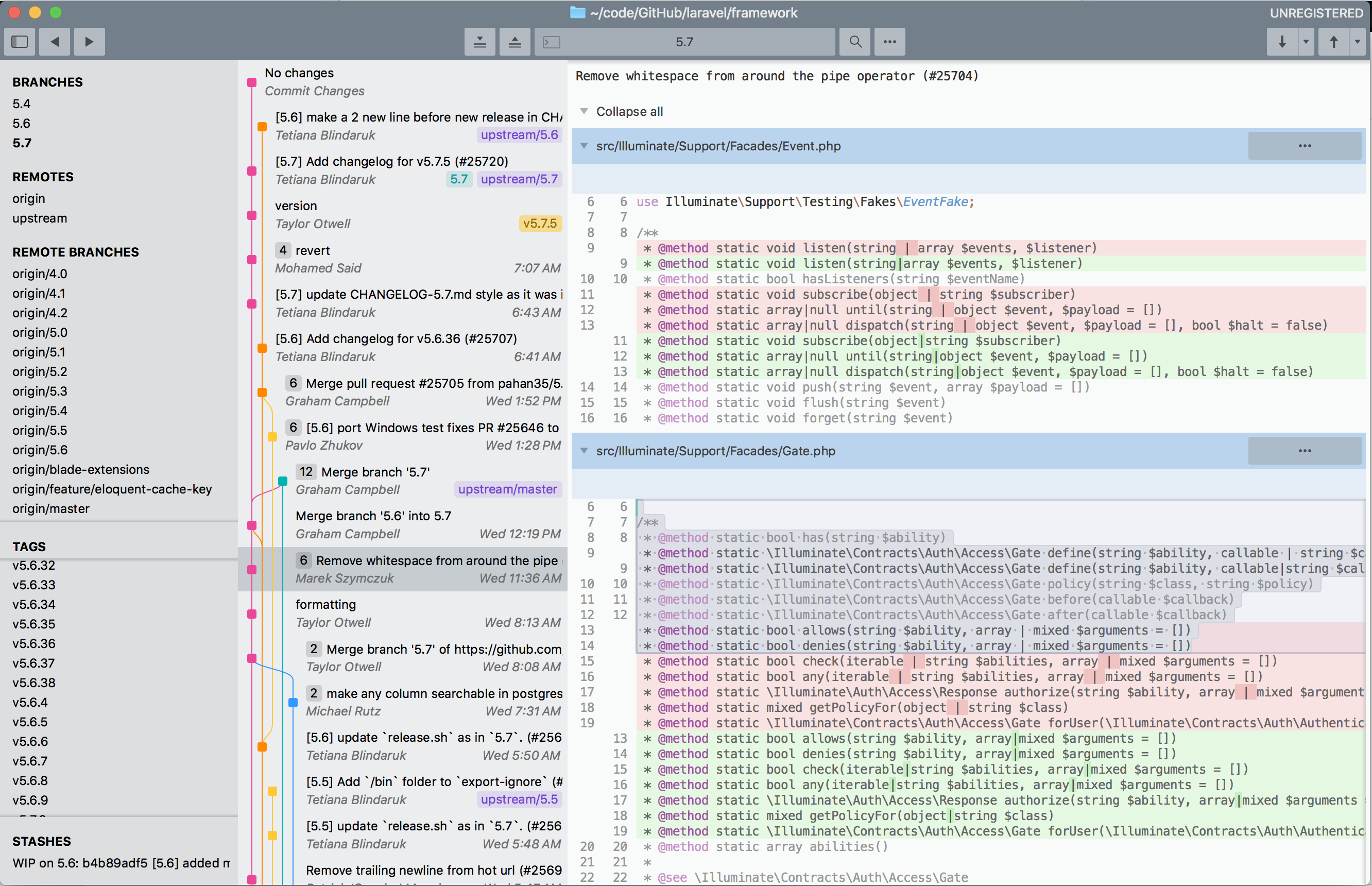
Some of the highlight features include:

  • Integrated merge tool
  • Unmatched performance thanks to Sublime’s platform and a custom high-performance Git reading library
  • Advanced Diffs
  • Powerful commit search
  • Blame – using the familiar sublime command palette
  • File and hunk history
  • Syntax highlighting – “We’ll even use any extra syntax definitions that we find in your Sublime Text installation for syntax highlighting!”

To me, Sublime Merge feels closer to the good parts of a terminal integration for Diffs than other GUIs but more snappy and intuitive to use than a terminal integration. As a Sublime user, I also find the shortcuts and thought-process of the UI intuitive and complimentary to my existing Sublime workflow.

This software took me by surprise in a good way, especially in the light of tools like Github Desktop and VS Code repo and diff tools, and GitHub integrations like the VS Code GitHub pull request extension.

I am curious to see if any integrations between Sublime Merge and Sublime Text unfold: such as opening the repository in Sublime Text from Sublime merge and navigating to Sublime Merge from Sublime Text. I have been using the GitHub desktop GUI more, and I find the shortcuts to open the repo in iTerm2 or Sublime to be very convenient.

Sublime Merge is free to use, having no time limits, accounts, etc., but the only catch is that you need a license to unlock the dark theme. You can pay for an individual or a business license in return for three years of updates with the purchase. An individual license is $99 at the time of writing and $75/year for a business subscription.

Check out the official news post for more information: Sublime Merge – Git, Done Sublime. You can download it and get more product information on www.sublimemerge.com.

Paul Redmond photo

Staff writer at Laravel News. Full stack web developer and author.

Cube

Laravel Newsletter

Join 40k+ other developers and never miss out on new tips, tutorials, and more.

image
Laravel Code Review

Get expert guidance in a few days with a Laravel code review

Visit Laravel Code Review
Acquaint Softtech logo

Acquaint Softtech

Acquaint Softtech offers AI-ready Laravel developers who onboard in 48 hours at $3000/Month with no lengthy sales process and a 100 percent money-back guarantee.

Acquaint Softtech
SaaSykit: Laravel SaaS Starter Kit logo

SaaSykit: Laravel SaaS Starter Kit

SaaSykit is a Multi-tenant Laravel SaaS Starter Kit that comes with all features required to run a modern SaaS. Payments, Beautiful Checkout, Admin Panel, User dashboard, Auth, Ready Components, Stats, Blog, Docs and more.

SaaSykit: Laravel SaaS Starter Kit
SerpApi logo

SerpApi

Access real-time search engine results through a simple API—no more scraping headaches! Use it for AI applications, SEO tools, product research, travel information, and more

SerpApi
Lucky Media logo

Lucky Media

Get Lucky Now - the ideal choice for Laravel Development, with over a decade of experience!

Lucky Media
Harpoon: Next generation time tracking and invoicing logo

Harpoon: Next generation time tracking and invoicing

The next generation time-tracking and billing software that helps your agency plan and forecast a profitable future.

Harpoon: Next generation time tracking and invoicing
PhpStorm logo

PhpStorm

The go-to PHP IDE with extensive out-of-the-box support for Laravel and its ecosystem.

PhpStorm
Get expert guidance in a few days with a Laravel code review logo

Get expert guidance in a few days with a Laravel code review

Expert code review! Get clear, practical feedback from two Laravel devs with 10+ years of experience helping teams build better apps.

Get expert guidance in a few days with a Laravel code review
Kirschbaum logo

Kirschbaum

Providing innovation and stability to ensure your web application succeeds.

Kirschbaum
Shift logo

Shift

Running an old Laravel version? Instant, automated Laravel upgrades and code modernization to keep your applications fresh.

Shift
Laravel Cloud logo

Laravel Cloud

Easily create and manage your servers and deploy your Laravel applications in seconds.

Laravel Cloud
Tinkerwell logo

Tinkerwell

The must-have code runner for Laravel developers. Tinker with AI, autocompletion and instant feedback on local and production environments.

Tinkerwell

The latest

View all →
Laravel Installer Now Returns JSON When Running Inside an AI Agent image

Laravel Installer Now Returns JSON When Running Inside an AI Agent

Read article
Queue-Wide Inspection Methods in Laravel 13.8.0 image

Queue-Wide Inspection Methods in Laravel 13.8.0

Read article
Verifiable Audit Logging with Laravel Chronicle image

Verifiable Audit Logging with Laravel Chronicle

Read article
Ship AI with Laravel: Search Entire PDFs with Zero Search Logic image

Ship AI with Laravel: Search Entire PDFs with Zero Search Logic

Read article
Personalized Content Delivery System: Building an AI-powered recommendation engine with Laravel and MongoDB image

Personalized Content Delivery System: Building an AI-powered recommendation engine with Laravel and MongoDB

Read article
Laravel Brain: Visualize Your Application's Request Lifecycle image

Laravel Brain: Visualize Your Application's Request Lifecycle

Read article